Opticon.Csp2Net
.NET package for interfacing with Opticon OPN Companion devices using the CSP2 protocol
Features
- Provides a C# interface for communicating with Opticon Companion devices using the CSP2 native functionality.
- Supports both legacy .NET Framework applications and modern .NET applications.
- Fully cross-platform on Windows, Linux, and macOS when running on supported .NET runtimes.
- Simplifies device connection, polling, barcode reading, and parameter management
Installation
Install via NuGet:
dotnet add package Opticon.csp2
Or search for 'Opticon.csp2' in the Visual Studio NuGet Package Manager.
Compatibility
| Platform / Runtime | Supported |
|---|---|
| .NET Framework 4.6.1+ | ✅ |
| .NET Standard 2.0 | ✅ |
| .NET Standard 2.1 | ✅ |
| .NET 6 | ✅ |
| .NET 8 | ✅ |
| .NET 9 | ✅ |
Operating Systems
| Operating System | Supported |
|---|---|
| Windows | ✅ |
| Linux | ✅ |
| macOS | ✅ |
Documentation
The full documentation of this package can be found here:
Usage
The following example demonstrates how to poll for devices, retrieve barcode data and manage device parameters.
using Opticon.Csp2Net;

class Program
{
    static async Task Main(string[] args)
    {
        Console.WriteLine($"Csp2Net Package Version = {OpnEnvironment.GetDllVersion()}");

        if (OperatingSystem.IsMacOS() || OperatingSystem.IsLinux())
            Console.WriteLine($"\nMake sure your device is configured to use the CDC-driver (default: BQZ; OPN-2500/OPN-6000 only)\n(See https://opticonfigure.opticon.com)\n");

        string logDirectory = Path.Combine(AppContext.BaseDirectory, "Logs");
        Directory.CreateDirectory(logDirectory);

        OpnDevice.StartPolling((device, connected) =>
        {
            try
            {
                if (connected)
                {
                    device.Connect();       // Not mandatory (port is automatically opened on each request if needed)
                    device.Interrogate();   // No longer needed (Interrogate is automatically called when requesting device info)

                    string deviceId = device.GetDeviceId() ?? "Unknown";
                    string model = device.GetModel() ?? "Unknown";

                    // Handle new connection
                    Console.WriteLine($"[{model}] [{deviceId}] [{device.PortName}] Connected ({device.GetSoftwareVersion()})");

                    // Read all barcodes from the device AND correct time stamps based on device and system time
                    var barcodes = device.ReadBarcodes(true);

                    Console.WriteLine($"[{model}] [{deviceId}] [{device.PortName}] {barcodes.Count} Barcode(s) Read");

                    string logFile = Path.Combine(logDirectory, $"Barcodes_{deviceId}.txt");

                    foreach (var barcode in barcodes)
                    {
                        DateTime ts = barcode.Timestamp;

                        string line = $"{barcode.Data};{ts:HH:mm:ss};{ts:dd-MM-yyyy};{barcode.SymbologyName};{deviceId}";

                        File.AppendAllText(logFile, line + Environment.NewLine);

                        Console.WriteLine($"[{model}] [{deviceId}] [{device.PortName}] [{ts}] [{barcode.Data}] [{barcode.SymbologyName}]");
                    }

                    device.ClearBarcodes();

                    // Sync device time AFTER reading barcodes to be able to correct time stamps based on the computer and device time
                    // Calling device.ReadBarcodes(true) already syncs the time
                    //device.TryGetTime(out DateTime dTime);
                    //device.SetTime(DateTime.Now);

                    // Demonstrates the reading and writing of all parameter types (bool, int, enum and string/byte array)
                    //device.GetParameter(OpnParameter.Code39, out bool enabled);
                    //device.GetParameter(OpnParameter.ScannerOnTime, out int time);
                    //device.GetParameter(OpnParameter.DeleteEnable, out DeleteEnableOptions deleteOptions);
                    //device.SetParameter(OpnParameter.Code39, true);
                    //device.SetParameter(OpnParameter.ScannerOnTime, 20);
                    //device.SetParameter(OpnParameter.Gs1DataBar, Gs1DataBarOptions.Gs1DataBar | Gs1DataBarOptions.Gs1Expanded);
                    //device.SetParameter(OpnParameter.ScratchPad, "Hello");

                    // Don't disconnect if you want callbacks for detecting new barcodes while connected (only works on Windows and using the USB-VCP driver)
                    device.Disconnect();
                }
                else
                {   // Handle removal / disconnect
                    if (device.GetDeviceId() != null)
                        Console.WriteLine($"[{device.GetModel()}] [{device.GetDeviceId()}] [{device.PortName}] Disconnected");
                    else
                        Console.WriteLine($"[{device.PortName}] Removed");
                }

                return 1; // Return 1 to indicate the device was successfully processed
            }
            catch (Exception ex)
            {
                Console.WriteLine($"Exception occurred ({device.PortName}): {ex.Message}");
                return 0; // Return 0 to continue polling, so we can retry later
            }
        });

        Console.WriteLine("Connect your OPN Companion devices.....");
        await Task.Delay(Timeout.Infinite);
    }
}
Troubleshooting
Device not found or recognized
On Linux and macOS, make sure your device is configured to use the CDC driver (default: BQZ; only supported on OPN-2500 and OPN-6000).
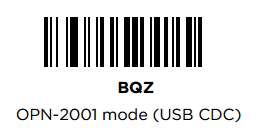
Note Laser scanners, like the OPN-2500, can't read barcodes from a screen. To print the barcode, use Opticonfigure
Legacy .Net Wrapper
For legacy application using the old .Net wrapper, 'Opticon.csp2'-calls are still available, but COM port numbers have been replaced by port names for cross-platform compatiblity. However, it is recommended to upgrade to the new CspNet implementation, since it's more suitable for Object-oriented programming and is more user friendly
License
This project is licensed under the MIT License.